Understanding Kubernetes Controller - The architecture
Let us deep dive into one of the K8s Control Plane component - The Controller(s).
Since we've already discussed Kubernetes components and how they communicate in the previous articles, we'll now start exploring them in more detail.
We'll begin with Kubernetes Controllers, often referred to as the brains of Kubernetes.
The Problem
Let's assume we have three instances of our application running, and all three are operating at 80% capacity. Everything is working fine, and users are being served without any issues.
Then comes the nightmare: one instance crashes.
Intelligent routing might redirect incoming requests to the remaining two Pods, but who notices that an instance is missing? Who creates a replacement? Who keeps track of whether the desired number of instances is running?
The answer is one of the K8s controller - The ReplicaSet Controller.
What is a Kubernetes Controller ?
A Kubernetes controller, in simple terms, is a component whose job is to bring the actual state of the cluster closer to its desired state. It continuously observes the resources it is responsible for and takes action whenever it detects a difference between the desired and actual states.
Kubernetes has many controllers, each responsible for a specific set of tasks. Although their responsibilities differ, they all follow the same underlying principle: reconcile the actual state with the desired state.
The Desired vs Actual state
Desired state is the state that the user or operator wants the cluster to maintain. It describes the target configuration of the cluster.
Actual state represents the current state of the cluster, based on what is actually happening at that moment. K8s components observe this state and work towards bringing it closer to the desired state.
The Working
Let us understand the working of any controller in K8s :
- Observation - The controller observe the current state of the resource it is responsible for.
- Comparison - It then compares the Desired state with the Actual state.
- Correction - if the state's don't match, it takes the necessary action. Depending on its responsibility, it might create a resource, update one, or remove one.
- Repetition - It doesn't stops after performing the task once, as changes can happen at any time, and the desired state may also change. So, it keeps reconciling.
A real controller - The ReplicaSet Controller
The ReplicaSet controller is one of the well-known controllers in Kubernetes. When we create a resource of type ReplicaSet, we specify the desired number of replicas (instances) we want to run. The job of this controller is to ensure that the number of matching Pods is equal to the desired replica count.
For example, let's say we create a ReplicaSet with replicas: 3. The controller observes the current state and finds that no matching Pods exist yet. It then requests the creation of three Pods through the API Server. Now, imagine one of these Pods gets deleted. The controller detects that only two matching Pods remain, even though the desired count is three. It requests the creation of another Pod to make up for the difference.
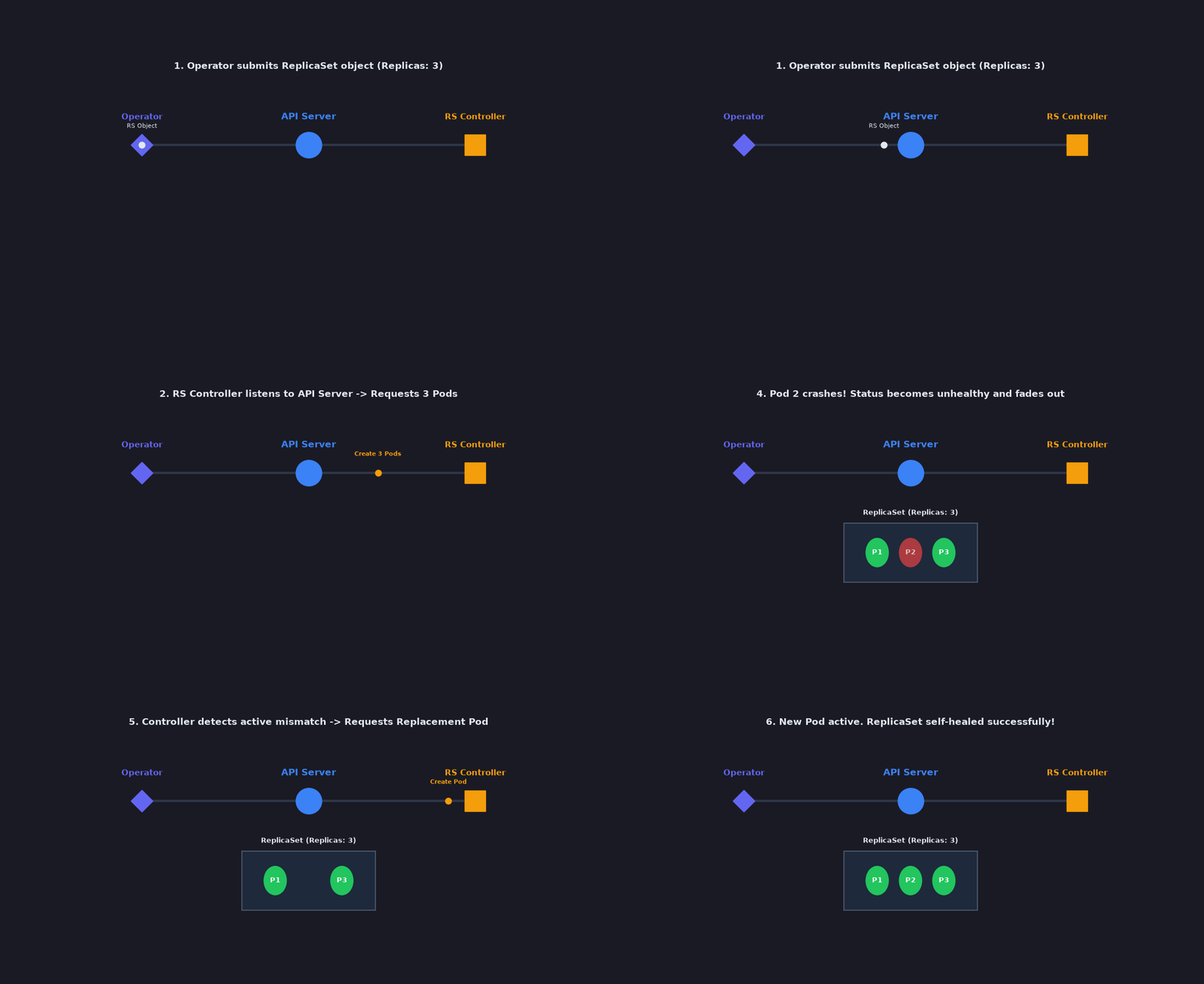
As discussed in the previous article, creating a Pod and running it are two different responsibilities. The ReplicaSet controller requests Pod creation, but it doesn't run the Pod itself. The Scheduler assigns the new Pod to a suitable Node, and the kubelet on that Node works with the container runtime to run its containers. We can refer to the previous article of the series for this.
This process continues as long as the ReplicaSet exists. Whether a Pod is deleted, fails, or the desired replica count changes, the controller keeps reconciling the state to bring the number of matching Pods closer to the requested count.
Other Controllers
Kubernetes has many controllers to manage different aspects of the cluster. Although their responsibilities differ, the underlying principle remains the same: to reconcile the actual state with the desired state.
For example, the Node Controller monitors the health of Nodes and responds when their state changes. Similarly, other controllers handle different responsibilities to help keep the cluster running as expected.
We'll explore these controllers in more detail as we encounter them in upcoming articles.
Thus, this marks the end of our introduction to Kubernetes Controllers!
We've seen why controllers are needed, how they work towards the desired state through reconciliation, and how the ReplicaSet controller applies this principle in practice.
But this is only the beginning. In the upcoming articles, we'll go beyond the concepts and explore how these controllers actually work under the hood by looking at the Kubernetes source code, examining debug logs, and even building a custom controller of our own.
Stay tuned for more!
You can find me here - LinkedIn Instagram Twitter(X)
Comments
Join the discussionNo comments yet. Be the first to comment.